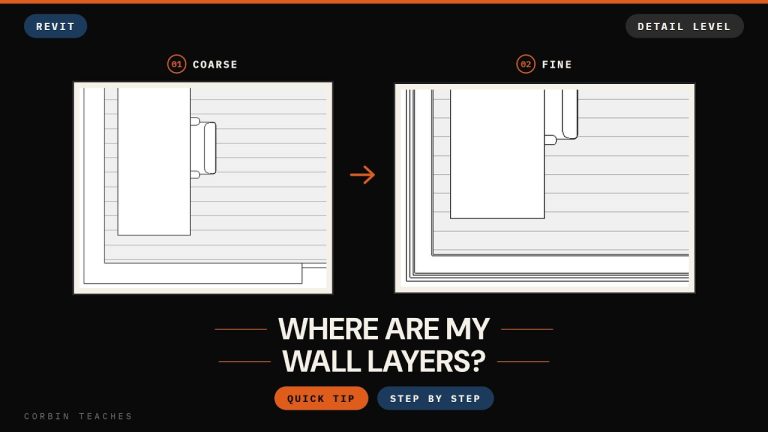
A wide-flange column that draws as a single line in section looks like something’s wrong with the family. It isn’t. This is the same Detail Level behaviour that hides wall layers, just applied to structure, and it catches people off guard because a beam drawn as a stick looks so much worse than a wall drawn as two lines.
What Coarse does to steel
I dropped a W-shape column in the middle of a small model. In the floor plan on Coarse, you can see it, but it’s very thin, more like a symbol than a section through steel. Go to a building section and it’s worse: the wide-flange beam is a single line. No flanges, no web, no depth. If you didn’t know better you’d assume the beam hadn’t been placed properly.
Switch the view to Fine
Bottom of the view, in the view control bar, change Detail Level from Coarse to Fine. The section now shows the actual I-shape with its flange thickness. Do the same in the plan and the column draws with its real profile instead of a sliver.
Each view has its own setting, so switching the section doesn’t switch the plan. That’s a feature. You can keep a simple framing plan on Coarse and a wall section on Fine in the same model.
What about Medium?
I went back and checked. Medium may show the profile as well; it depends on how the family was built. Worth trying if Fine is making a view too busy. I generally keep my views on either Fine or Coarse and don’t spend much time in between.
If you’re seeing this problem with walls, floors or roofs rather than steel, it’s the same fix. And since Detail Level is one of the properties I leave unchecked in my view templates, you can change it on any view without touching the template.
━━━━━━━━━━━━━━━━━━━━━━
🔗 RESOURCES
━━━━━━━━━━━━━━━━━━━━━━
📐 Notion Business OS for Architects (free + paid templates): https://cpd.gumroad.com/l/civaw
📐 Free Notion Issue Tracker for Architects: https://cpd.gumroad.com/l/cjlls
🌐 More Revit tutorials: https://corbinteaches.com
━━━━━━━━━━━━━━━━━━━━━━
CHAPTERS
━━━━━━━━━━━━━━━━━━━━━━
0:00 Detail level, applied to structure
0:21 Thin column in plan, a line in section
0:36 Switch to Fine
0:57 Checking Medium
━━━━━━━━━━━━━━━━━━━━━━
CONNECT
━━━━━━━━━━━━━━━━━━━━━━
Subscribe: https://bit.ly/3VFqR86
Instagram: https://bit.ly/3J8l6Io
Architecture work: https://bit.ly/3VPUnrJ